- Aitetic
- May 7, 2026
Local language models have moved from a research curiosity to a practical tool. Developers, researchers, and small teams want to experiment with open-weight models on their own hardware, test prompts privately, and connect models to internal tools — without sending data to a hosted provider. What is missing in many setups is a clean, opinionated interface that ties the model server, the chat experience, and the tooling layer together.
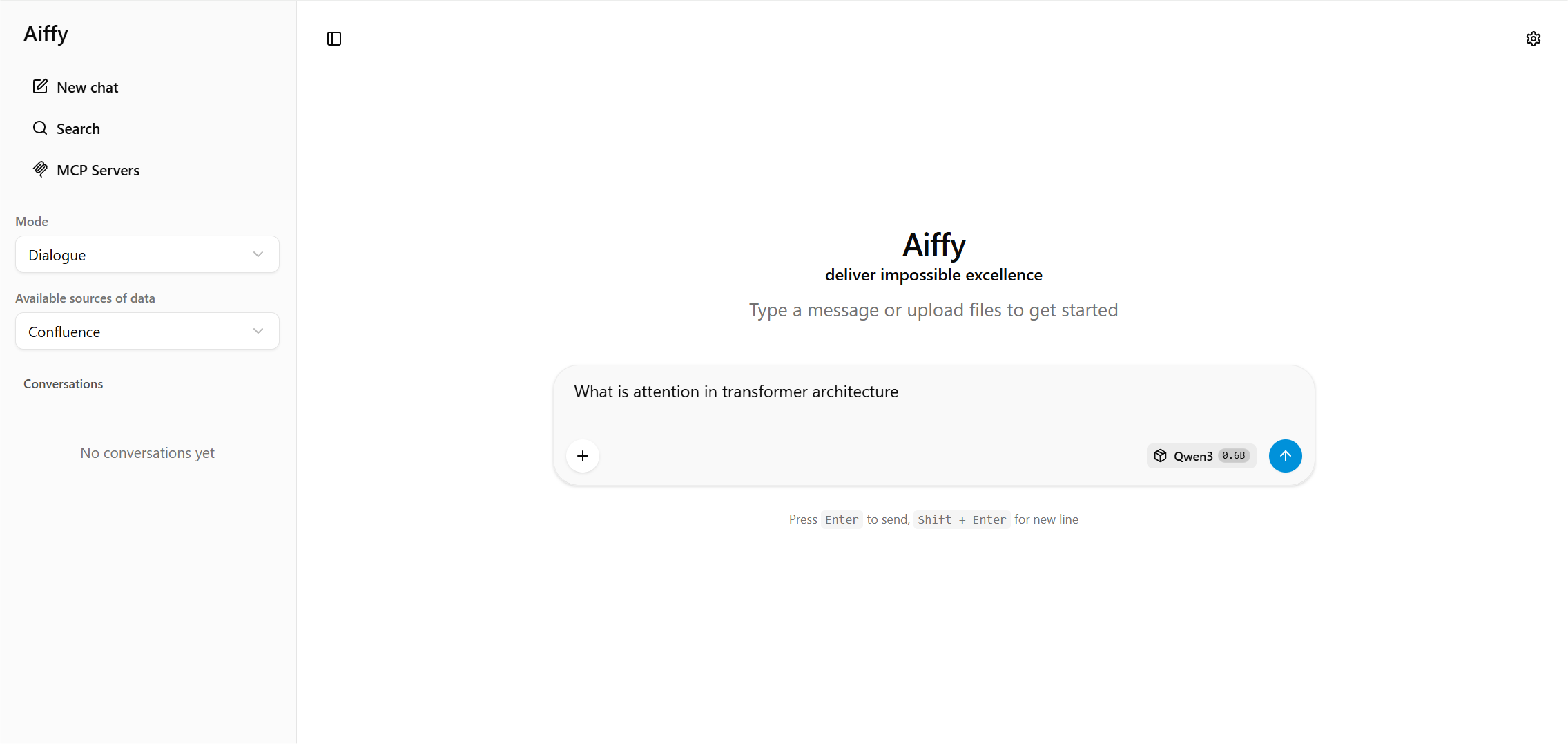
Aiffy is built to fill exactly that gap. It is an adaptive UI shell for large language models that combines a SvelteKit + TypeScript frontend with a Python backend based on FastAPI and Hugging Face Transformers. The same build runs equally well as a personal app on a developer workstation or as a deployed service behind a shared host, with a familiar chat experience, responsive interaction, and straightforward integration with model backends — suitable for local or remote inference, prompt testing, and everyday work with language models.
What is Aiffy?
Aiffy is not a wrapper around a hosted API. It is a complete local stack with two components that ship together:
- FastAPI LLM server that loads a model with
Hugging Face Transformersand exposes a chat endpoint; - SvelteKit + TypeScript chat UI that provides settings, theme controls, and integration points.
The frontend is compiled into a static bundle that the Python server serves directly, so a single process is enough to run the entire product locally. There is no separate Node runtime to manage in production, no external database, and no required network calls beyond the optional model download from Hugging Face Hub.
Aiffy is designed around three principles:
- Adaptive deployment — runs the same way on a developer workstation or as a deployed server, and keeps all conversation data in the browser;
- Chat-first — the interface is a polished multi-turn chat, not a generic playground;
- Practical for builders — it ships with the building blocks you need to extend it: agent tooling, an intent classifier, configurable data sources, and an explicit prompt-style switch for base vs instruction-tuned models.
Key Features of the Aiffy LLM Chat Interface
- Clean chat interface for working with large language models in a browser.
- Conversation history for keeping previous prompts and responses available.
- Local and self-hosted LLM support for private AI experiments and internal workflows.
- Developer-oriented workflow for testing prompts, models, sampling settings, and tool calls.
- Browser-based LLM chat UI that keeps the interaction simple, fast, and accessible.
Quick Start for Local LLM Workflows
Aiffy is intentionally easy to launch. After installing the Python dependencies, a single command brings up the server and serves the precompiled UI:
pip install -r requirements.txt
python server.py --model gpt2
Once the server is running, the demo is available in the browser at http://127.0.0.1:8080. The default port and host can be overridden with --port and --host, and a bearer token can be required via --api-key when the server is exposed beyond localhost.
Flexible Model Loading for Local and Hub Models
Aiffy resolves the --model argument through a clear priority order, so you can move between local checkpoints and Hugging Face Hub models without changing how you launch the server:
- if the value is a path that exists on disk, it is used directly;
- otherwise, if a folder with that name exists under
models/in the repository, it is taken from there; - otherwise, the model is downloaded from the Hugging Face Hub.
This means the same command shape works for a local GPT-2 checkpoint, a curated model in your repository, or a remote model identified by its Hub ID:
python server.py --model gpt2 --prompt-style raw
python server.py --model Qwen3-0.6B
python server.py --model Qwen/Qwen2.5-1.5B-Instruct
python server.py --model ./models/gpt2 --prompt-style raw
Device placement and dtype are auto-selected by default, with explicit overrides available for users who want to pin the model to cpu, cuda, or mps, or to force float16, bfloat16, or float32 precision.
Prompt Styles for Base and Instruction-Tuned Models
Different families of models expect different prompt formats. Aiffy makes that explicit through a prompt-style switch instead of guessing silently:
auto(default) — uses the tokenizer'schat_templatewhen available; otherwise falls back to aChatML-style format with<|user|>and<|assistant|>markers. This is the right choice for instruction-tuned models such as Qwen-Instruct or Llama-Instruct.raw— concatenates the message contents with newlines and no role markers. This is the right choice for base completion models such as GPT-2, which simply continue the text.
Choosing the wrong style is a common reason a local model produces gibberish or refuses to answer, so Aiffy treats this decision as an explicit configuration option rather than a hidden default.
Sampling and Greedy Decoding
Aiffy follows a simple rule for decoding mode: there is no separate do_sample flag. The mode is inferred from the temperature value. Any temperature meaningfully above zero enables stochastic sampling with the configured temperature, top_p, top_k, and repeat_penalty. A temperature of zero (or any value at or below a small epsilon) switches the model to deterministic greedy decoding.
This keeps the mental model small: one knob, one behaviour. Defaults are stored in a single DEFAULT_GEN_PARAMS object on the server and surfaced to the frontend as placeholders in the Settings → Generation tab. To force greedy decoding for a single request, simply set temperature: 0 in the request body or in the UI.
Visual Theme Support for Long LLM Sessions
Appearance settings live in Settings → General → Theme and are persisted in browser storage. Aiffy ships with four themes out of the box:
System— follows the operating system colour scheme and switches automatically when the OS preference changes;Light— forces the light palette regardless of OS settings;Dark— forces the dark palette, suitable for low-light work;KDE Breeze— a Plasma-inspired theme with a blue accent on a dark base, with KDE-style radii and font tweaks layered on top of the dark token set.
The theme system is designed to be extensible. Adding a new appearance is a matter of registering it in the theme enum, adding it to the settings list, and providing the matching CSS overrides — the rest of the UI picks it up automatically.
Chat Modes: Dialogue and QA for Conversation History
The first dropdown in the left sidebar controls how much conversation history is sent to the model on each turn. Aiffy offers two modes:
- Dialogue (default) — sends all messages from the active conversation, so the model sees its own prior replies and can refer back to earlier context;
QA— sends only the latest user message plus any system message, treating each turn as an independent question.
The selection is persisted in browser storage and synchronised across the UI. Filtering happens on the way out, just before the request is sent — the conversation in IndexedDB and on screen is never modified, so switching from QA back to Dialogue mid-thread restores the full context for the next request. This is also independent of the server-side history cap (--max-history), which limits history for any client; QA mode strips it client-side before the request even leaves the browser.
Configurable Data Sources
The left sidebar surfaces a list of configurable data sources — for example, projects in Jira, spaces in Confluence, or repositories on GitHub. The list is driven by a small JSON config file that the server serves alongside the UI bundle:
{
  "Jira": ["Project Alpha", "Project Beta"],
  "Confluence": ["Engineering Docs", "HR Space"],
  "GitHub": ["frontend", "backend"]
}
The file can be edited directly with no rebuild required, which makes it easy to adapt the same Aiffy build to different teams or projects without recompiling the frontend.
Agent Tooling for Developer-Focused LLM Interfaces
Aiffy includes a built-in agent tooling layer that lets the server classify a user message into a tool call and execute it server-side, instead of generating a plain chat reply. A provider is a Python class that implements three methods:
classifier_prompt()— the system prompt for the intent-classification pass, instructing the model to returnJSON;normalize_result()— validates and cleans the JSON the classifier returned;execute()— runs the tool by name and returns its result.
The chat persona prompt and the classifier prompt are kept strictly separate. The persona is used when the classifier returns unknown and the request falls through to plain generation, while the classifier prompt is used only for the isolated classification pass. This separation is important — collapsing them into one prompt is the most common reason a tool-enabled model starts replying in JSON for ordinary chat messages.
A reference notebook provider ships with the project, demonstrating five tool intents (add, search, list, delete contacts and notes). Each tool method is a stub with a clear extension point, so building a new tooling backend is mostly a matter of swapping the prompt, normaliser, and tool implementations.
Intent Classifier Testing
To make tooling reliable, Aiffy ships with a standalone test harness for the intent classifier. It loads the model directly, replays a curated set of utterances, and reports classification accuracy without starting the HTTP server, opening any ports, or requiring external services. This makes it easy to iterate on the classifier prompt and verify that real user phrasings are routed to the right tool before deploying changes.
Generation Settings and Sampling Controls
The Settings panel exposes a full set of sampling parameters surfaced from the server's defaults. Empty values are shown as placeholders and are not sent on the wire — the server-side default is used instead. Out of the box, the UI exposes:
temperature,top_p,top_k,min_p— core sampling controls;repeat_penalty,presence_penalty,frequency_penalty— repetition controls;dynatemp_range,dynatemp_exponent— entropy-based dynamic temperature;xtc_probability,xtc_threshold— XTC sampler;dry_multiplier,dry_base,dry_allowed_length,dry_penalty_last_n— DRY sampler for long-context repetition control;max_tokens,typ_p, and acustom JSONfield for arbitrary parameters.
The same surface also includes quality-of-life options: keeping generation statistics visible after the response finishes, displaying tokens-per-second and duration under each assistant message, rendering user content as Markdown, controlling autoscroll behaviour, and pre-encoding the conversation after each turn so that the next prompt is already cached on the server while the user reads the previous reply.
MCP Servers
Aiffy supports the Model Context Protocol. MCP servers can be configured directly from the settings UI as a JSON list and are invoked alongside built-in tools. Per-server usage statistics are tracked locally so it is easy to see which integrations are actually being used. This makes Aiffy a practical host for both ad-hoc personal MCP servers and shared team integrations.
Reasoning, Continue, and Python Interpreter
Several features are tailored to modern open-weight models that emit chain-of-thought or that benefit from incremental generation:
- Reasoning controls — the UI can show the thought process inline while the model is still producing it, and lets the user choose whether reasoning from previous turns is fed back into the next request, so the model sees its own chain-of-thought across turns;
- Continue generation — assistant messages can be extended with a single click, which is useful when the model stops mid-thought or hits a token limit;
- Built-in Python interpreter — an optional
Pyodide-based runtime that executes Python code blocks from the chat directly in the browser, with no server round trip.
Architecture of the Browser-Based LLM Chat Interface
The project layout is intentionally small and easy to navigate:
server.py— the FastAPI server, model loading, prompt building, and the streaming chat endpoint;models/— local model checkpoints (excluded from the repository);server/public/— the compiled UI bundle and the runtimeconfig.json;server/webui/src/— the SvelteKit + TypeScript source for the frontend;server/webui/static/config.json— the source data-source configuration that is copied intoserver/public/on every build.
Rebuilding the UI is only required when the frontend source changes. A standard npm install followed by npm run build produces the bundle that the Python server then serves directly.
Where Aiffy Fits in the Open-Source LLM UI Ecosystem
The open-source LLM UI ecosystem is crowded — text-generation web UIs, chat shells around llama.cpp, hosted-model playgrounds, and full AI workspaces all coexist. Aiffy occupies a deliberately narrow niche: it is the UI shell you reach for when you want a clean, opinionated chat experience over your own model, with first-class support for prompt iteration and a small but useful tooling layer.
Aiffy is a strong fit when you want to:
- experiment with local open-weight models in a polished chat interface;
- iterate quickly on prompts and sampling parameters without leaving the browser;
- build a small intent-classification + tool-execution layer on top of an existing model;
- host a private, single-process LLM frontend on a developer workstation or an internal box;
- prototype an AI-assisted internal tool before committing to a heavier stack.
It is intentionally not a multi-user SaaS, a document-RAG workspace, or a vector database manager. That focus is what keeps the surface small and the experience fast.
Conclusion
Aiffy is a small but complete local UI for large language models. It pairs a SvelteKit chat interface with a FastAPI + Transformers backend, supports both base and instruction-tuned models through an explicit prompt-style switch, exposes a full set of sampling controls, and includes a clean tooling layer for intent classification and tool execution. The visual side is taken care of with four built-in themes — System, Light, Dark, and KDE Breeze — and the conversation side with explicit Dialogue and QA (Question-Answering) modes.
For developers and AI practitioners who want a private, chat-first interface to their own model, with a well-defined surface for extension and no cloud dependencies, Aiffy provides a practical starting point.
GitHub Link: https://github.com/aitetic